
Start with what you want visitors to do
Before choosing a screen or a game mechanic, finish this sentence: ‘We want someone walking past our booth to…’ Your answer might be to try a product, play a quick challenge, join a group activity or start a conversation with the team.
Pick one main action. If visitors need to read several instructions, complete a form and learn a new game before they can play, walk through that entire journey with your agency. Decide which steps belong before the game and which can happen afterwards.
For a mall roadshow, also consider the person watching from the aisle. Can they see where to start and understand the action without a long explanation? Use a clear invitation and a visible place for the next player to wait.
Match the interaction to the experience
Physical buttons and props
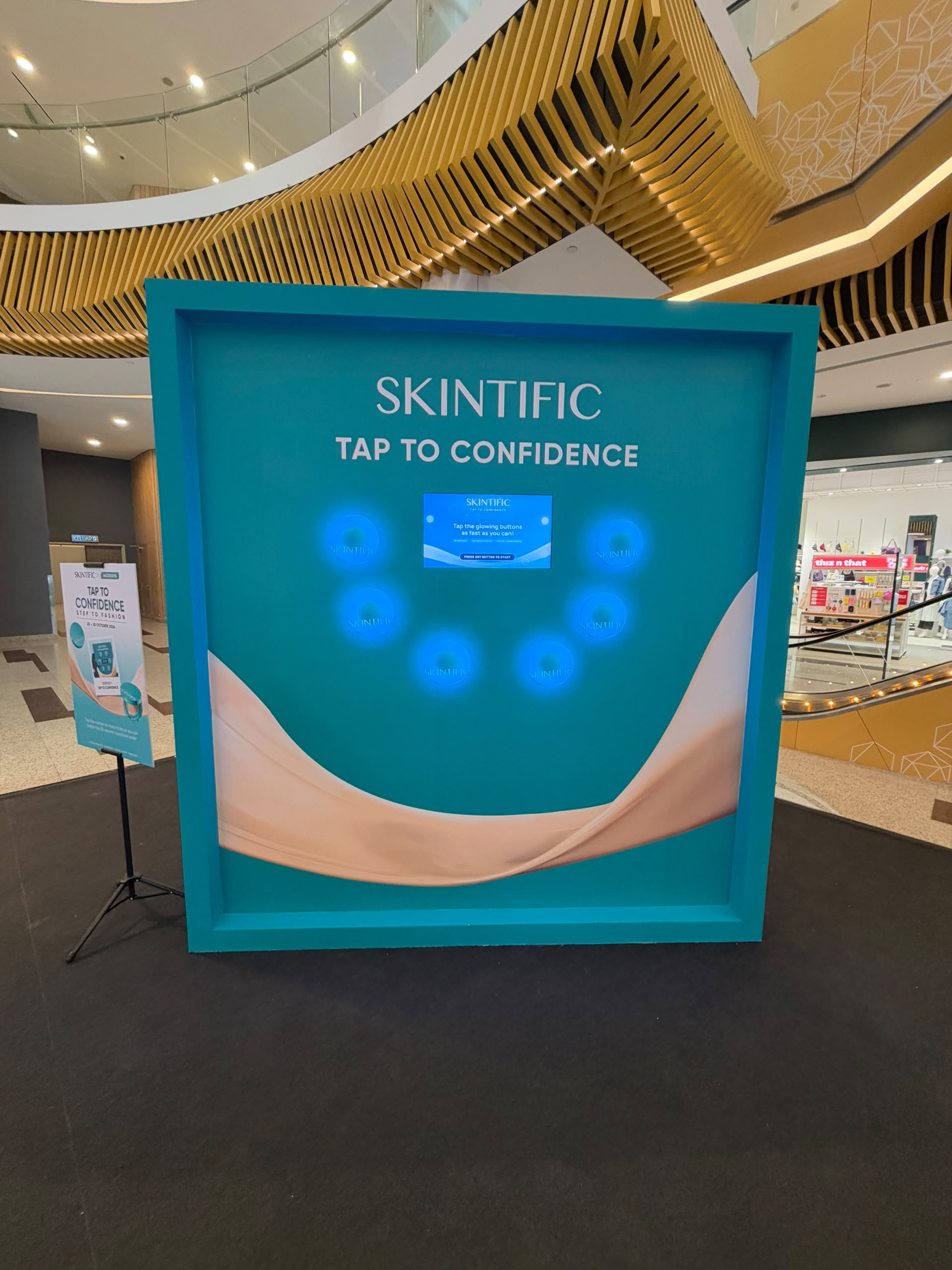
Consider this format when a hands-on action is part of the idea. At the SKINTIFIC roadshow at Sunway Velocity, Tap to Confidence used six illuminated physical buttons with a score and countdown on screen. Visitors followed the lights and tapped to score. The installation gives you a concrete example of a reaction-game format.
Touchscreen mini games
Consider a touchscreen when your concept centres on tapping or making choices on a display. The Nesh Glacier Drop mini game is one example in our work. Plan the screen position, readable instructions and the reset between players as carefully as the artwork.
Movement games
A movement concept asks visitors to participate with their body rather than just a finger. Discuss the sensing method, clear play area, camera position if required and an alternative for visitors who cannot perform the intended movement. See the movement game examples for a starting point.
Plan the whole turn, including the reset
A turn includes more than the countdown. Walk through the invitation, instructions, play, result, any next step and the return to a ready screen. Ask who explains the game and who helps if a visitor gets stuck.
- Mark the player area and the waiting area on the booth plan.
- Check whether spectators can still see the screen.
- Agree how a completed or abandoned game resets.
- Confirm whether registration, prizes or lead capture are part of the brief; do not assume they come with every game.
If you need an estimate of how many people can play, time a complete trial turn and discuss the expected arrival pattern. Use that rehearsal to plan staffing and stations instead of relying on the gameplay timer alone.
Bring a clear brief to the build
Share the venue, booth dimensions, event schedule, audience and your preferred example. Add the brand files, intended language, power and connectivity information, and any required reporting. Confirm which party supplies the display, physical props, stand and on-site support.
For an agency working with several suppliers, put the software and physical installation responsibilities on the same checklist. A game can look ready while a cable route, mounting position or visitor instruction still needs a decision.
Use our event technology brief checklist to gather the details, then tell us about the game you have in mind.
A few common questions
Can the game use our brand?
Visuals, instructions and game flow can be discussed around your campaign. Confirm the customisation scope, supplied artwork and approval process before production.
Does every game include a leaderboard or registration?
No. Scoring, leaderboards, registration and prizes are separate decisions in the project brief. Choose the features that support the visitor journey and confirm them in the proposal.